
Finding the motivation to stay fit while traveling can be challenging enough without having to worry about unfamiliar gym equipment or limited workout options. Enter Gymverse, a workout app from the makers of the popular 5K Runner app that promises to solve these exact problems by creating personalized training plans that adapt to whatever equipment you have available, whether you’re in a fully equipped hotel gym or working out in your room with nothing but your body weight.
TL;DR:
- Type: Workout Planner with professional-designed plans
- Price: Price: $19.99/month or $119.99/year ($5/month annual with our 50% discount)
- Free version: 7-day free trial
- Best for: Travelers who want tailored, flexible training plans that adapt to any equipment situation
What We Like vs. What Could Be Better
| What we like ⭐️ | Not so much ❌ |
|---|---|
| Expert-Created Plans: Built by real coaches, not just AI, with proper progression and deload logic. | No Gym Profiles: Cannot save multiple equipment setups, requires manual changes. |
| Equipment Flexibility: Adapts workouts to whatever equipment is available. | Exercise Difficulty: Some recommendations may exceed your level. |
| Adaptive Programming: Adjusts future workouts based on your performance. | High Price: $19.99/month (regular price) is above most competitors. |
| Video Demos: Clear exercise videos included for every movement. | Limited Trial: 7-day trial with most features locked. |
| Full Customization: Create or modify plans to fit your situation. |
After spending weeks testing this app across different travel scenarios, from boutique hotels with minimal fitness facilities to resort gyms with full equipment ranges, we’re ready to share our complete assessment of whether Gymverse lives up to its promises for the traveling fitness enthusiast.
What Makes Gymverse Different
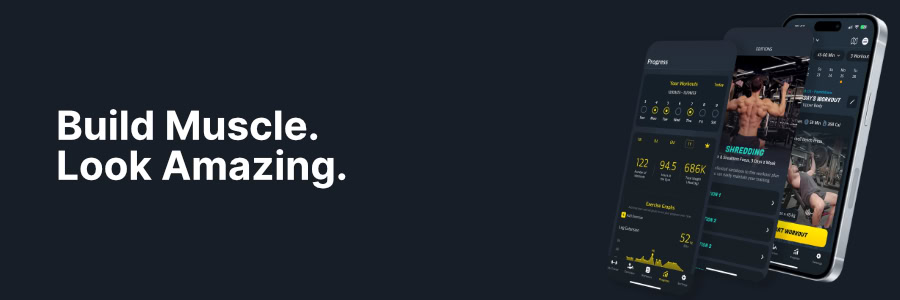
Unlike many fitness apps that rely purely on AI algorithms, Gymverse uses professionally designed program templates that are then adapted by AI to your specific situation. While the app uses AI for personalization and exercise selection, the underlying program structure and progression logic are built by real fitness professionals.
The app’s standout feature is its comprehensive onboarding process. During setup, you’ll answer detailed questions about your fitness goals, experience level, preferred workout duration, available equipment, and even your biggest gym challenges. This isn’t just a quick survey. It’s a thorough assessment that ensures your generated workout plan matches your real-world situation, whether you’re in a boutique hotel with minimal equipment or a resort with a full fitness center.
Gymverse for Travelers: Key Features
1. Equipment Flexibility for Changing Environments
One of Gymverse’s strongest selling points is how it handles equipment limitations. During setup, you can select exactly what equipment you have access to, and the app will never prescribe exercises requiring tools you don’t have. This feature proved invaluable when testing the app at a small hotel gym that only had dumbbells up to 40 pounds and a basic cable machine.
You can adjust these equipment settings anytime your situation changes. Moving from a hotel with a full gym to one with just a few machines? Simply update your available equipment in the app, tap “Refresh Plan,” and you’ll get a completely new program tailored to your current setup.
Even better, you can modify your equipment list during your workout if machines are broken or occupied too long, a common frustration in hotel gyms. This real-time adaptability means you’re never stuck waiting for equipment or unable to complete your workout due to broken machines.
While this manual adjustment system works well and doesn’t interrupt your ongoing workout plan, the app would benefit enormously from preset gym profiles similar to what Fitbod offers. Imagine, these profiles could potentially be shareable among users, creating a community-driven database of gym setups. This would make switching between different travel scenarios nearly instantaneous and significantly enhance the app’s value for frequent travelers.
2. Maintenance Mode for Busy Travel Days
Gymverse recognizes that not every workout during travel needs to be about making gains. The app includes a “maintain current fitness” goal option, which is perfect for work trips or vacation days when you want to stay active without the pressure of progressive training.
Even on non-training days, Gymverse offers movement suggestions for active recovery. You might find recommendations for a 20-30 minute low-intensity walk session, perfect for exploring a new city while staying active.
This thoughtful feature acknowledges the reality of travel fitness, where sometimes just moving your body is victory enough.
3. High-Quality Exercise Demonstrations
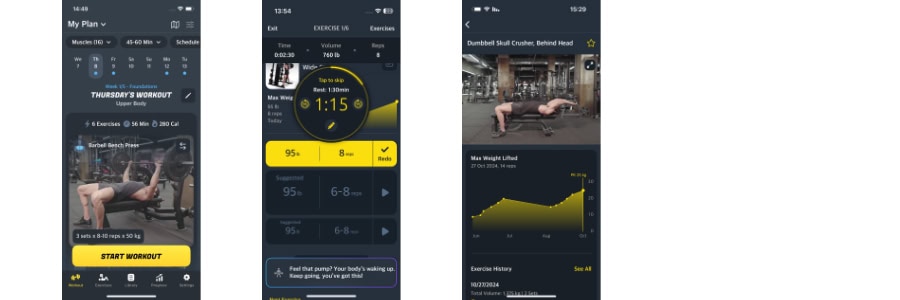
Each prescribed exercise comes with a clear video demonstration, eliminating the need to leave the app and search for instructions online. This feature becomes especially valuable when you’re pressed for time or dealing with unfamiliar equipment in a foreign gym where asking for help might be challenging.
4. Real-World Performance Tracking
Gymverse doesn’t just create your workouts, it learns from your performance and adjusts accordingly. The app tracks your progress across multiple metrics including completed workouts, total gym time, and weight lifted over various time periods. More importantly, it uses this data to intelligently adjust your future workout targets.
During our testing period, we noticed the app became more conservative with weight recommendations when progress stalled (common when dealing with unfamiliar equipment) and more aggressive when we were progressing smoothly. This adaptive approach feels much more personalized than apps that simply increase weight by a set percentage each week.
The progress tracking extends beyond just numbers. You can upload progress photos for side-by-side comparisons and log body measurements across seven different areas. For travelers who worry about losing fitness gains during extended trips, these visual tracking tools provide reassuring feedback about maintaining progress.
5. The Library Advantage
Beyond generating custom programs, Gymverse offers an extensive library of pre-made workout plans covering various training splits like Push/Pull/Legs, Upper/Lower, and traditional body part splits. Each plan can be filtered by duration, making it easy to find something that fits your available time slot.
The flexibility extends to individual workouts too. You can pull single sessions from different programs without committing to an entire plan, perfect for those unpredictable travel days when you need a quick, effective workout but don’t want to follow a structured program.
Getting Started With Gymverse
Getting started with Gymverse is effortless. Download the app on your phone, create an account, and start your free 7-day trial. Complete the onboarding questionnaire that only takes a few minutes, and you’re ready to start logging your first assigned workout.
The app provides a complete overview of your training plan with a horizontal menu at the top, which you can tap on to adjust variables such as what muscles you’d like to exclude, how long you want each workout to be, and what your preferred training schedule is.
At the bottom, you can navigate to the Library section, where you can access multiple pre-made workout plans for different workout frequencies. Next to it, you can tap on Progress to see your workout consistency, gym performance, progress photos, body measurements, and weight.
What the Gymverse Community Says
Gymverse maintains solid ratings across app stores, with users consistently praising several key aspects particularly relevant to travelers:
- The professional program design that feels more thoughtful than AI-generated alternatives
- The equipment flexibility that adapts to changing hotel gym situations
- The high-quality video demonstrations that eliminate guesswork in unfamiliar environments
- The ability to adjust plans on the fly when travel circumstances change
User feedback consistently highlights the app’s strength in adapting to real-world constraints, making it particularly valuable for those dealing with unpredictable travel schedules and varying equipment availability.
Gymverse Pricing
Gymverse doesn’t have a free version, but there is a free 7-day trial. This is enough time to test the app and decide if it’s for you and if you find it useful for staying fit on the road.
Subscription Options
Beyond that, the subscription options are:
- Monthly: $19.99
- Annual: $119.99
For frequent travelers, the annual subscription represents the better value at approximately $9.99 per month, or $5 with our discount. When compared to the cost of a single personal training session, Gymverse offers significant value for those who travel regularly and want consistent fitness guidance.
Update July 21, 2025: Unfortunately, the lifetime option is no longer available.
Our Expert Assessment: Is Gymverse Worth It for Travelers?
After extensive testing across various travel scenarios, from boutique hotels with minimal fitness facilities to resort gyms with full equipment ranges, our assessment is that Gymverse represents a solid choice for travelers who value professional program design and equipment adaptability.
Four factors make it particularly suitable for travel fitness:
1. Professional Program Design: The human-created programs feel more thoughtful than AI-generated alternatives, with proper consideration for advanced training concepts like progressive overload and deload weeks.
2. Equipment Adaptability: The app’s ability to generate effective workouts based on available equipment removes the common frustration of having a workout plan that doesn’t match what’s available in your hotel.
3. Real-Time Adjustments: The capacity to modify your program variables instantly when travel circumstances change makes it genuinely practical for unpredictable travel schedules.
4. Exercise Flexibility: All exercises offer alternatives that can be swapped both before and during your workout. If a machine is broken, the gym is crowded, or you’re uncomfortable with a prescribed movement, you can easily substitute exercises. You can even edit your available equipment list mid-workout when hotel gym machines are in use or out of order.
While the subscription cost is higher than some competitors, the professional program design and comprehensive feature set provide good value for serious travelers who prioritize maintaining structured fitness routines on the road.
Limitations to consider: The monthly subscription price of $19.99 is steep compared to many fitness apps, especially when paid month-to-month. Some exercise suggestions can be overly ambitious for the described fitness level, and the lack of pre-set gym profiles means you’ll need to manually adjust equipment settings each time you switch locations.
Final Verdict: A Strong Travel Fitness Solution
Gymverse stands out as a well-designed solution for travelers who want professionally crafted workout plans that adapt to changing environments. Its strength lies in the thoughtful program design and equipment flexibility that addresses the real challenges of travel fitness.
The app succeeds where many fitness apps fail by recognizing that real-world workout conditions are rarely perfect. The human-designed programs feel more thoughtful than AI-generated alternatives, and the ability to adjust variables on the fly makes it genuinely useful for the unpredictable nature of travel fitness.
For occasional travelers or those on a tight budget, the steep monthly subscription cost might be prohibitive. However, the Gymverse annual deal at $119.99 provides excellent value for committed travelers. If you want Gymverse at 25% off, check our Membership Benefits section.
Those who struggle with workout consistency on the road will find that Gymverse offers a level of flexibility and personalization that’s hard to find elsewhere, and the annual option makes it particularly compelling for anyone planning to maintain long-term travel fitness routines.
While it would benefit from features like preset gym profiles and more exercise alternatives, the core offering provides solid value for travelers who prioritize structured, professional guidance in their fitness routines.
Check out our hotel gym guides and equipment reviews to make the most of your workouts, no matter where your travels take you. Discover which hotels offer the best fitness facilities and get insider tips for staying active on the road.
Frequently Asked Questions About Gymverse
Can I use Gymverse without any equipment?
Yes, Gymverse works perfectly for bodyweight-only workouts. During setup, simply select “no equipment” when asked about your available gear, and the app will generate a complete training plan using only bodyweight exercises. This makes it ideal for hotel room workouts when you don’t have access to a gym, or for travelers staying in accommodations without fitness facilities. You can switch between equipment and no-equipment modes anytime your situation changes.
Does Gymverse work offline?
Gymverse requires an internet connection for initial setup and to sync your workout data, but once your training plan is loaded, you can access your workouts offline. This means you can complete your session even in hotel gyms with poor Wi-Fi or cellular coverage. However, you’ll need to reconnect to save your progress and download new workouts. The exercise demonstration videos are also available offline once they’ve been loaded initially.
How does Gymverse compare to Fitbod for travelers?
Both apps excel at adapting to available equipment, but they take different approaches. Fitbod uses AI to generate workouts on the fly and offers preset gym profiles, making it faster to switch between different hotel gyms.
Gymverse uses professionally designed programs with more structured progression and deload weeks, but requires manual equipment adjustments each time you change locations. Fitbod costs less at $12.99/month versus Gymverse’s $19.99/month, though our discount brings Gymverse down to $10/month annually.
Choose Fitbod if you want quick equipment switching and AI-generated variety, or Gymverse if you prefer professionally structured programs with built-in progression logic.
Can I cancel my Gymverse subscription anytime?
Yes, you can cancel your Gymverse subscription at any time through your App Store or Google Play account settings. There are no cancellation fees or penalties. If you cancel during your free 7-day trial, you won’t be charged anything. If you cancel a paid subscription, you’ll retain access until the end of your current billing period (either monthly or annual). This flexibility makes it easy to try Gymverse for a single trip or pause your subscription during periods when you’re not traveling.
Is Gymverse good for beginners?
Gymverse works well for beginners, but with some caveats. The app’s onboarding process asks about your experience level and adjusts the program accordingly, with clear video demonstrations for every exercise. However, some users report that exercise recommendations can be overly ambitious even when selecting “beginner” level. The adaptive programming helps, as the app will adjust future workouts if you struggle with prescribed weights or exercises. Beginners benefit most from Gymverse’s structured approach and comprehensive video library, but may need to be conservative with weight selections initially and use the exercise swap feature when movements feel too advanced.