
Fitness apps are everywhere. Go to Google Play or the App Store and you can find countless options, each promising to take your fitness to the next level.
Most apps seem good enough, but there is often something that stands out negatively. Maybe it is a mediocre rating, a cluttered interface, or a paid-only option with a short trial.
But then you come across an app like Hevy: top-rated, with a clean interface, and a clear promise. It tracks your performance, makes workout logging a breeze, and even allows you to socialize with friends and other like-minded people. Plus, it has a free, no-ads version.
For travelers who are serious about staying consistent with their training, whether at a hotel gym in Tokyo or a fitness center in New York, having a reliable workout tracker makes a real difference. So, naturally, you want to take a closer look.
Read our guide to learn what makes Hevy truly special and why you should consider using it on your next trip and beyond.
TL:DR
- Type: Workout Tracker
- Price starts at $2.99/month
- Free Version: Yes (no ads)
- Best for: Social Experience
Hevy Review 2026: Track Your Workouts Like a Boss
Working out is fun. There are countless exercises, intensity techniques, training splits, and set structures. Each activity is a unique experience, and the feeling of mastering a new movement is incredibly fulfilling.
But what is not fun is the chore of logging your workouts to track your progress. This is why you often see people working out but not tracking progress, or only logging a session here and there.
Sure, using a physical log or notebook works, but it is still a hassle and adds extra time to your workouts, time you may not always have, especially when you are traveling and squeezing in a session between meetings or sightseeing.
The solution? A workout logging app. More specifically? Hevy.
Hevy’s clean interface and numerous useful features allow you to log workouts quickly and stay focused on what you are supposed to be doing: working out. Once you have logged enough workouts, the app presents all of your data in a simple way, making it easier to track progress no matter where in the world you happen to be training.
Trainees who log their workouts have a much better idea of their starting point and whether they have made progress. As a result, they can make better training decisions, waste less time, and achieve their goals more quickly.
Simplicity That Keeps You Coming Back
A common issue among many fitness apps is their convoluted interface, which makes it difficult to get started, figure out what to do, and seamlessly log workouts in seconds. This means the user experience is not ideal, and you are more likely to give up, especially mid-trip when your routine is already disrupted.
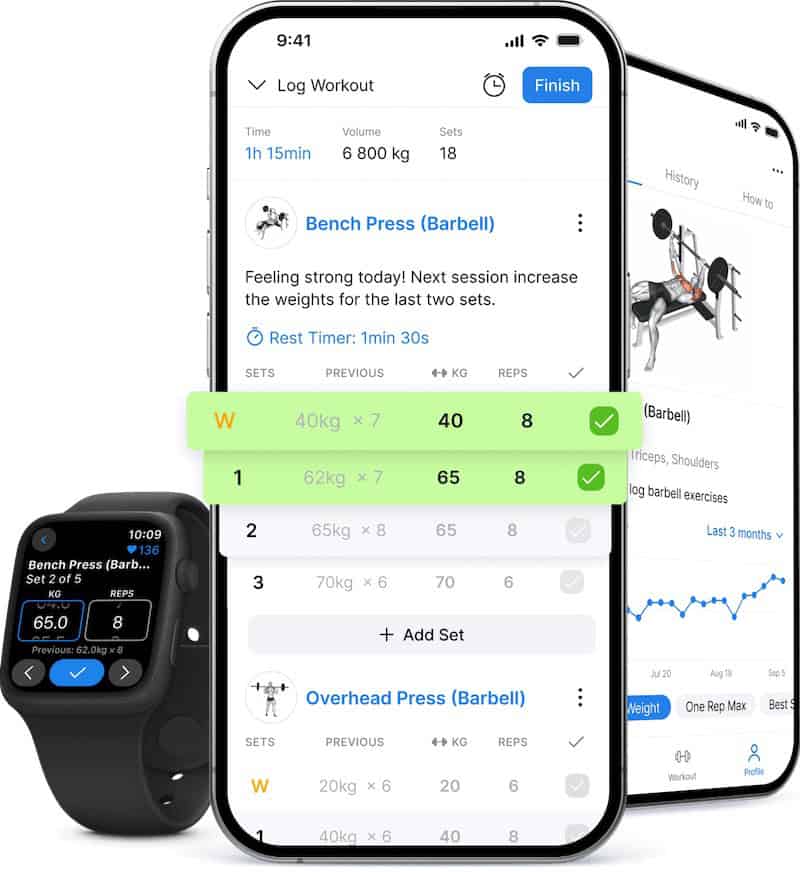
One thing that sets Hevy apart is its simplicity of use. You are only shown the most important things, and the interface is laid out intuitively. But despite its simplicity, the app is far from basic.
It includes many features found on more cluttered apps, as well as some unique additions that make it stand out. Everything is a tap or two away, and it never feels like you are spending valuable exercise time on logging sets.
Some of Hevy’s Fantastic But Less-Known Features
Despite its simplicity, the Hevy fitness app is a treasure trove of fantastic features that make workout tracking a genuine pleasure. Aside from logging workouts, you can:
Add notes to individual exercises. For example, if you feel particularly strong or weak on a given day, note it to have more information when reviewing your performance later. This is especially useful when training in an unfamiliar gym and you want to remember something specific about the equipment or setup.
Create custom exercises. Hevy’s exercise library has over 400 activities, but what if it does not include one of your favorite movements? You can tap the “Create” button in the Exercises section and add all the relevant details: name, photo, target muscles, type, and more. Save the movement and use it in any workout you want.
Track performance on individual lifts. Are you a powerlifter, Olympic lifter, or simply performance-oriented? Navigate to the Exercises tab in the profile section, see all the exercises you have ever logged, and monitor your performance over time. You can see how much weight you have lifted over time, what your personal records have been, what your projected 1RM is, a complete history of that specific exercise, and other insightful details.
Record measurements and body weight. Hevy allows you to track body measurements and easily compare the values over time. You can log body part circumferences, including your chest, biceps, thighs, waist, and more.
Upload progress photos. You can upload progress photos alongside measurements and body weight. Easily compare photos from different periods to monitor visual progress when building muscle and losing fat.
Share your workouts. Hevy lets you share each workout with others, even if they do not use the app.
Use the social media shareables. Each workout you log in Hevy generates multiple visual elements, such as a workout summary (duration, weight lifted, number of sets, and more), a list of the exercises done, the weight lifted compared to a real-world object, and personal records. You can save any of them to your phone and share them on social media to show off your progress and dedication.
Get a monthly update on your training. Hevy’s monthly reports provide an overview of your training and compare it to previous months. See how many workouts you did, how much time you spent training, your total volume load, the number of sets, your personal records, and many other useful details. You can also share any monthly highlight you are proud of with friends outside Hevy.
Sync Hevy with Google Fit and Apple Health. Connect the app to track your workouts on these platforms for more centralized monitoring.
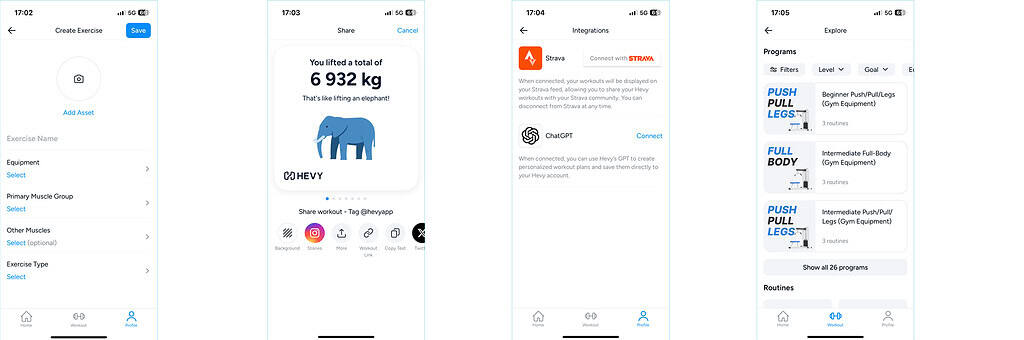
Integrate Hevy with Strava. Hevy easily integrates with Strava via Settings, allowing you to share your gym and strength workouts with more people. The two apps work well together, letting you share workouts in detail along with the visual summaries Hevy generates.
Use the plate calculator. Hevy’s plate calculator feature lets you quickly determine what plates you should use based on what is available and how much weight you want to lift. To use it, add a barbell exercise to any workout, tap to add the weight per set, and select the Calculator button that appears on the bottom left, just above your keyboard. It will tell you exactly what plate combinations you need to achieve any load you input in the kg or lbs field.
Log workouts like a pro. The interface is clean and simple, but there are countless neat features that allow you to log exactly what you do at the gym. You can add 400 or more exercises from the rich library, as well as custom exercises you create. You can easily add and remove sets on each exercise and mark individual sets by type: normal, warm-up, to failure, or drop set. You can log the weight, reps, and even RPE on each set, and quickly see your previous performance under the Previous column. When you mark a set as complete, the automatic rest timer starts, letting you know exactly how much time you have before the next set. For even more flexibility, you can combine exercises into supersets that include more than two movements, essentially creating a circuit if you enjoy CrossFit, Tabata, or MetCon-style workouts.
Access the rich program library. Looking for workout inspiration? Hevy offers 26 complete programs for trainees of all levels and for various equipment setups. There are also multiple categories of routines, including at-home, travel, resistance band, bodyweight, and cardio/HIIT. You can browse all programs and routines, and save the ones you like to your personal library, all for free. This is particularly handy when you land at a hotel and are not sure what equipment is available.
Log your rate of perceived exertion (RPE). Hevy lets you log the difficulty of each set, allowing you to track your effort over time. The value also appears under the Previous tab when logging exercises during live workouts, giving you insight into past performances. For example, if you lifted 100 kg for 5 reps with an RPE 9 before and can now lift the same with an RPE 7, it still means you have gotten stronger. This is the type of insight that sets Hevy apart from many other workout loggers.
These are just some of the features that make Hevy an incredibly versatile, fun, and motivating workout logger, one that has earned its near-perfect rating of 4.9 out of 5 stars on the App Store and Google Play.
Plan and Put Together Workouts in Minutes
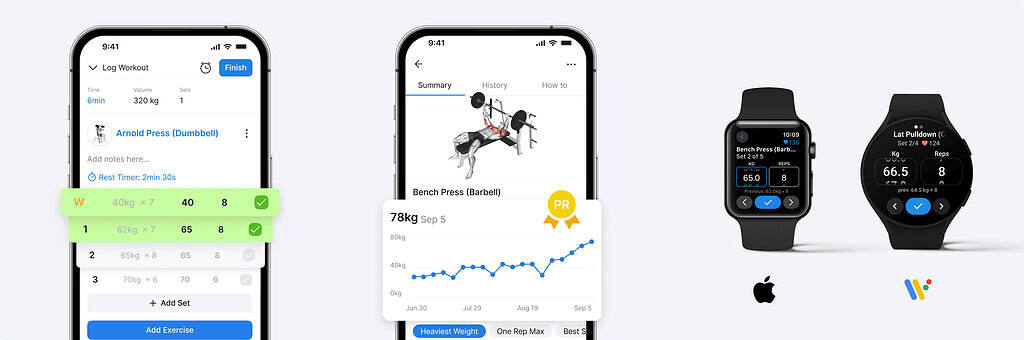
All of the above features sound great, but you are probably wondering how Hevy actually performs as a workout planner and logger day to day.
Once you have set up your account, navigate to the Workout tab and get started immediately. Tap on “+ Start Empty Workout” if you are at the gym and want to log your upcoming session. Add all the exercises you want from Hevy’s rich library, add sets, mark the sets by type, log the weight, and start logging. It takes around a minute to get going, and afterward you simply log the reps (and, optionally, the RPE) for each set, mark it as complete, and finish the session.
If you enjoy planning, you can create reusable routines saved to your profile. Hevy’s free version allows you to save up to four routines. These work as templates for your training sessions. Tap on “New Routine,” select the folder where you want to save it (you can create different folders for various splits like upper/lower and push/pull/legs), and start adding exercises. Add as many exercises as you want, along with training details such as sets and their type, rest times, target weight, reps or rep range, and custom exercise notes.
Exercise notes are useful for reminding yourself of a particular tip or cue when it is time to train. For example, you can set a reminder to always train through a full range of motion, keep your knees out while squatting, or brace before pulling a deadlift.
Alternatively, you can explore workouts from other users and save them to your profile to do whenever you want. You can also navigate to the Workout tab, select Explore, and find a pre-made training plan that fits your goals, experience, and available equipment. This is especially useful when you are traveling and want a solid bodyweight or hotel gym session without spending time planning.
Hevy’s program library features 26 complete training programs, as well as eight categories of one-off workouts, including at-home no-equipment sessions, dumbbell-only routines, and more. Browse all workout plans and routines, find the ones that fit your preferences, and save them to your profile, all for free. You can also adjust any of the training variables to further customize the workouts. For instance, if you download the Beginner Push/Pull/Legs program but cannot do a specific exercise, simply remove it or replace it with another movement and get started.
Analyze Your Performance
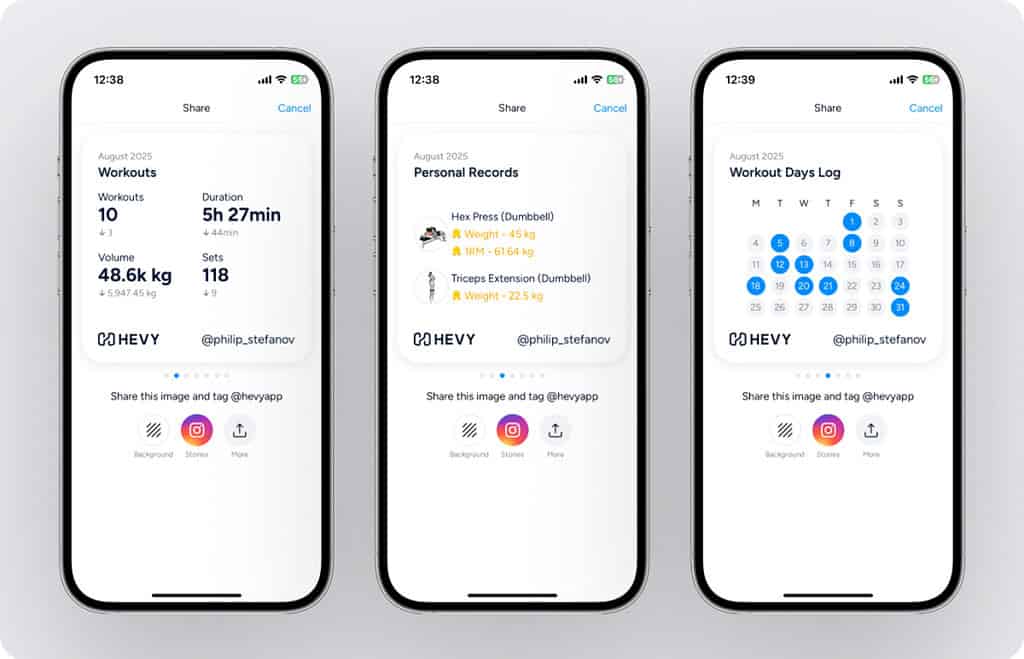
As you log and save workouts to your profile, Hevy collects your data and displays it in a clean, organized way. You can:
View performance on individual lifts. Select any exercise you have logged to look at your entire history, along with all the workouts where you have done it, and your list of personal records.
Track your training consistency. Navigate to the calendar to see how consistent you have been this month, year to date, and all-time. Tap on any date to see what workout you did on that day.
Review sets per muscle. Training volume matters for progress, so monitor exactly how many sets you do for each muscle group. Navigate to the statistics tab and filter the data by muscle and time range.
See your muscle distribution. A full-body heat map and chart show how your total training for the current week looks and which muscle groups you have been targeting.
Compare yourself on the leaderboard. Hevy allows you to compare your performance on select exercises to all of your friends inside the app. See how you rank on a given lift and get motivated to improve.
Review monthly reports. All of the above (and more) is summarized in a clean monthly report, available at the start of each new month. Hevy does an excellent job of putting your efforts into perspective and showing how last month’s training compared to before.
The Social Aspect of Hevy: When Things Click Right
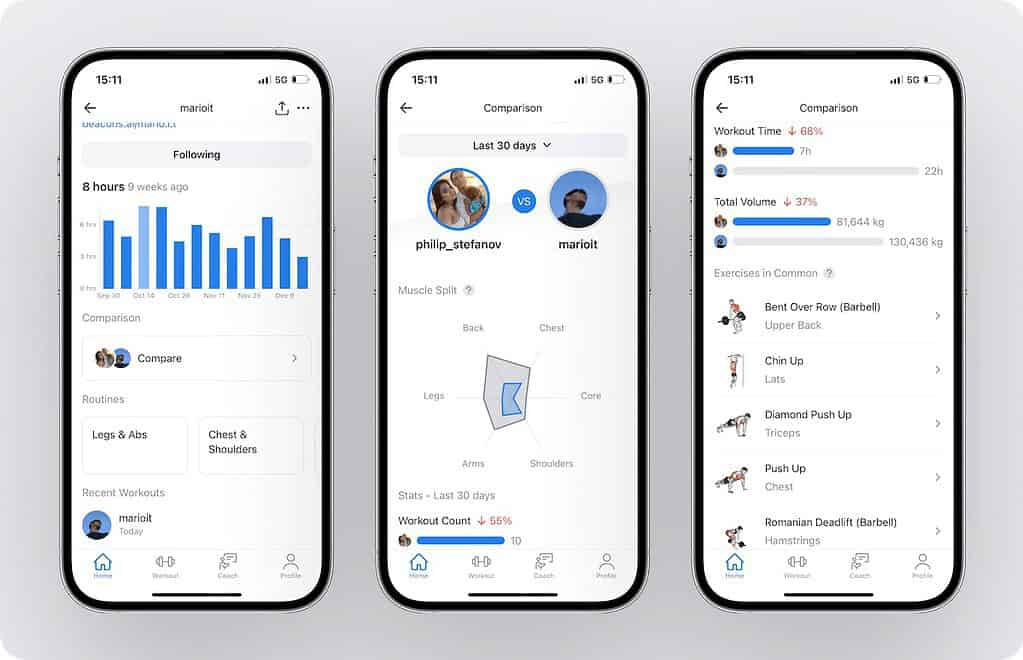
One thing Hevy does particularly well is creating a community of like-minded people looking to improve themselves and help others. At the time of writing, Hevy has a solid user base of over 9 million athletes.
The app does not just provide a fancy way of tracking your workouts. It also makes you feel like you belong to a community of great people, which can be a real motivator when you are on the road and missing your regular training partners.
You can follow others and see their workout updates in the Home feed. You can comment on their updates and show your support by hitting the “Like” button. As you complete workouts and share updates, users can follow you to see how your training is progressing.
Hevy’s social aspect might not seem all that important at first, but it provides two huge advantages: encouragement and accountability. Posting your workouts for others to see is a great way to receive instant feedback and encouragement. As a result, you stay more motivated and feel much more fulfilled. Knowing that others expect you to show up is also a great way to stay accountable and train even when you do not feel like it after a long travel day.
The Hevy team continually works on the app’s social side and adds improvements such as:
- Liking other people’s comments
- Replying to specific comments
- Inserting clickable links in comments
- Seeing the mutual followers of athletes’ profiles
There are many small features and design improvements worth discovering on your own. Of course, Hevy’s social features are not mandatory, and you can disable them if you prefer privacy. All you have to do is head over to your profile and make it private. You can also remove the “Suggested Users” section from the app’s social settings.
What Do Others Say About the Hevy Fitness App?
Hevy is steadily growing into a prominent workout app with excellent user ratings. The app has an impressive 4.9 out of 5 rating on the App Store and Google Play, with more than 200,000 reviews at the time of writing.
One of the things people love about Hevy is its simplicity, versatility, and social aspect.
Here is what Sydney wrote:
“I love this app! It is easy to use, shows form, tracks my weights for every exercise I do, makes it fun, and thanks to the fitness group on social media I am a part of, I have been able to connect with others. We cheer each other on, and it really helps.”
And here are a few words from Mark, another Hevy user:
“I really like this app because it is simple and easy to log sets quickly. I especially like the fact that you can mark each set as a drop set or a failure set, which not a lot of other apps do.”
What We Think of Hevy
Hevy is a fantastic workout-tracking app. It boasts a clean interface and numerous excellent features. Unlike most apps on the market, Hevy also comes with social features that make the training experience more engaging, whether you are working out at your home gym or in a hotel fitness center halfway across the world.
Research shows that social support can go a long way in helping you stay motivated and committed to your fitness plan. It is also a fantastic way to learn and get inspired by others.
What is even more impressive about Hevy is how quickly the app gets updated. Bugs are fixed almost immediately, and valuable features are regularly added to the interface without making the app feel bloated.
How to Get Started with Hevy
Head over to Google Play or the App Store, download the app, and create a profile. You can also use the Hevy website to create a profile from your computer, or use your Google, Apple, or Facebook account to log in.
Once inside the app, create a new workout or explore existing routines from other users. The app prompts you to name your routine (for example, “Upper Workout”) and add exercises.
You can add as many sets as you want for each exercise, select the weight, and add a rest time. Doing so allows you to track your rest periods without having to leave Hevy during your session.
When finished, save your workout routine and you are ready to get started. This process should not take more than five minutes.
How Much Does Hevy Cost?
What is great about Hevy is that the app is entirely usable and ad-free even without a Pro subscription. With the free version, you can enjoy the social aspect, log your workouts, and review your performance.
Is Hevy Pro Worth It?
As much as the free version offers, Pro unlocks additional perks:
- Save more than four routines (reusable workout templates) to your profile at once
- See performance history that extends beyond three months
- Create and store more than seven custom exercises simultaneously
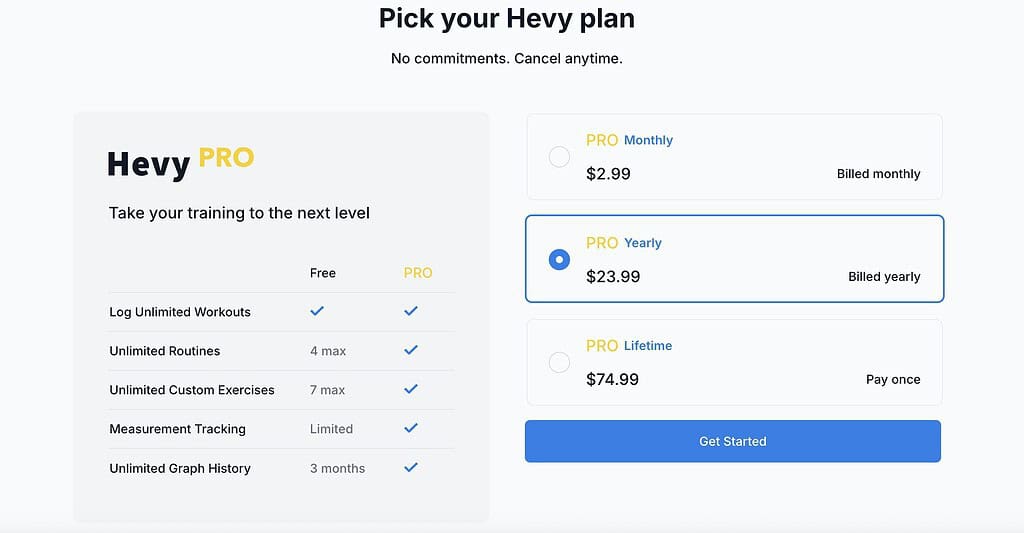
To unlock these features, here are Hevy’s current pricing options:
- Monthly: $2.99
- Yearly: $23.99 (discounted to $21.59)
- Lifetime: $74.99
Hevy’s Pro version is much cheaper than most other apps on the market. For reference, Strong costs $4.99 per month, which is almost twice as expensive. Similarly, JeFit’s Elite monthly subscription is $12.99. Beyond the Pro features, you also support a fantastic development team with your paid Hevy subscription.
Use “HOTELGYMS” as the discount code when signing up her. When you create your new account, simply select your plan and add the discount code. Of course, you can also continue with the free plan.
If you are an existing Hevy user and are having trouble applying the discount code, please reach out to us or Hevy, and we will help you get it sorted out quickly.
Final Words
Hevy is an excellent choice if you are looking for a simple, reliable, and ad-free workout tracker with an active community. Whether you train at your local gym or squeeze in sessions at hotel gyms while traveling, it gives you everything you need to stay on track.
Thanks to its intuitive interface, the Hevy workout app blends numerous useful features, allowing you to put together routines, log workouts, and review your performance in minutes.
However, if Hevy does not seem like the right fit, you can check out our page comparing the top selected fitness apps for even more options to help you achieve your fitness goals. Fitbod, Alpha Progression, or Freeletics might be apps worth exploring.
FAQ
Is the Lifetime Deal for Hevy App Worth It?
The Lifetime deal for Hevy App is worth considering, as it grants access to all premium features and future updates for a one-time payment. If you plan to use the app for more than two years, it becomes a cost-effective option that eliminates the need for yearly subscription fees. You also get the assurance of a lifetime membership to a high-quality fitness app.
Hevy vs. Strong: Which Is Better?
Development looks more consistent with Hevy than with Strong these days. That is why we would recommend Hevy over Strong, particularly because of its unique features and active community.
| Feature | ⬛ Hevy | 🔵 Strong |
|---|---|---|
| Free Version | ✅ | ✅ |
| Monthly / Yearly Price | $3.99 / $23.99 | $4.99 / $29.99 |
| Graphs | Free | Paid plan only |
| Measurements | Free | Paid plan only |
| Plate Calculator | Free | Paid plan only |
| Workout Statistics | 3 Months in free plan | Paid plan only |
| Sharing Workout Feature | ✅ | ❌ |
| Calendar Feature | ✅ | ❌ |
| Social Feature | ✅ | ❌ |
| Apple Watch | ✅ | ✅ |
| Web Platform | ✅ | ❌ |
| OS Support | Android and iOS | Android and iOS |
Both apps have excellent ratings in both app stores, averaging 4.9 from many thousands of users, so you would not go wrong with either. That said, Hevy’s regular updates, social features, and lower price point give it a clear edge.
How to Migrate from Strong to Hevy
When switching fitness apps, you most likely want to preserve your history from previous workouts. Luckily, Hevy offers an easy migration from the Strong App. Follow these steps:
- Open the Strong App and go to Settings, then select Export Strong Data.
- Save the CSV file to your phone.
- In the Hevy App, go to Settings and select Export & Import Data, then Import Data.
- Import the CSV file you exported earlier and wait until the task is completed.
Enjoy!