
Most fitness apps are designed around a single assumption: you train in the same place, with the same equipment, week after week. Set your gym once, and the app quietly builds every future workout around that setup.
Travel breaks that assumption completely. One week you have a full hotel gym, the next you have a single dumbbell rack, and the week after that you have nothing but a yoga mat and floor space. For an app built around a fixed environment, that is a problem it was never designed to solve.
In practice, this shows up in one of two ways. Either the app forces you onto a single fixed program regardless of what is actually in front of you, or it makes you rebuild your entire setup, goal, experience level, training split, and all, every single time your equipment changes. Neither is sustainable if you travel often.
The more frequently you travel, the more this compounds. A single trip a year is an inconvenience you work around. Weekly or biweekly travel is different: every reset of your settings is a small tax on your time and motivation, paid over and over. For frequent travelers, that tax adds up to skipped sessions, not because the workout itself was hard, but because figuring out what to select before starting felt like its own chore.
Fitbod’s Solution: One App, Multiple Training Environments
This is exactly the gap Fitbod was built to close. If you have not used it before, here is the short version: Fitbod is an AI-driven workout app that generates your exercises, sets, reps, and weights based on your goal, experience level, and what equipment you currently have access to.
The part that matters for travel is how it separates those inputs. Your goal, training split, and experience level represent your overall training approach, the “who you are as a trainee” settings. Your equipment represents your current environment, the “where you happen to be right now” setting. Most apps blur these together into one profile you have to rebuild every time something changes. Fitbod keeps them apart, so changing your environment does not mean changing your training approach.
In practice, that means you set up your goal and training style once, then add a lightweight setup for each place you train. Walk into a new hotel gym, tell the app what equipment is there, and everything else, your goal, your split, your experience level, carries over automatically.
What Recently Changed: Gym Profile Is Now Part of My Plan
That system recently changed shape, and it is worth understanding before you set anything up. If you have used Fitbod before and are expecting a screen called “Gym Profile,” you may now be looking at something new called My Plan. This is not a cosmetic rename, and most guides on this topic, including Fitbod’s own older posts, have not caught up on what actually changed.
- My Plan is a broader hub that now houses your Goals, Training Profile, Training Format, and Preferences, all in one place, for your whole account.
- What used to be a single, separate “Gym Profile” per hotel or gym has been folded into that hub and is now called a Location, managed under Equipment & Locations inside My Plan.
- Because goal, training split, and experience level now live in My Plan rather than inside each individual profile, they automatically apply across every Location you add. Only the equipment list differs from one Location to the next.
Under the old Gym Profile system, creating a setup for a new hotel meant rebuilding your goal, split, and experience settings from scratch, or duplicating an old profile and hoping you remembered to update everything. With My Plan, you set your training approach once. Everything else about how a new location works comes down to a single, narrower piece: the Location itself.
Some travelers have pushed back on this, since it used to be possible to run an entirely different program at each gym. Fitbod has confirmed the shift is intentional, not an oversight. It is tied to a larger project aimed at bringing more structure and consistency to how workouts are programmed, so you only touch your training settings when you actually want a different overall workout experience, not every time you change location. Fitbod has also noted that this consistency across locations is a technical requirement for the new programming logic to work correctly, not just a design preference.
Zooming In on Locations: The Part That Actually Matters for Travel
This is the piece worth understanding in detail, because it is the one setting that changes every time you check into a new hotel.
A Location in Fitbod holds exactly one thing: your available equipment at that place. Nothing about your goal, split, or experience level lives inside it. That narrow scope is what makes it useful for travel, you are not managing a full profile every time you move, you are managing a single, short equipment list.
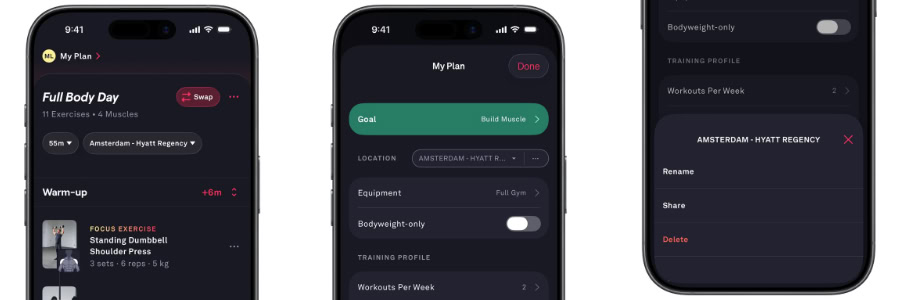
Setting Up a Location, Step by Step
- Open the Workout tab.
- Tap My Plan (or your current gym profile name at the top-left on older app versions).
- Select Location, then Add New Location.
- Name it something you will recognize on the road, for example “W Barcelona Hotel Gym” or “Hotel Room.”
- Select the equipment available at that location.
- Confirm your workout duration and any location-specific extras (warm-ups, cardio, circuits).
Location Settings That Matter Most on the Road
| Setting | Why It Matters for Travel |
|---|---|
| Available Equipment | The single most important travel setting. An accurate list prevents the app from suggesting a barbell squat rack that does not exist in your hotel gym. |
| Workout Duration | Set a shorter default (20 to 30 minutes) for a “Hotel Room” location so a busy travel day does not mean skipping the session entirely. |
| Bodyweight-Only | Toggle this on for any location without equipment. It restricts recommendations to push-ups, squats, lunges, and core work, no guesswork required. |
| Warm-Ups & Cardio | Useful defaults for a hotel gym location, worth turning off for a five-minute hotel room session where every minute counts. |
It is worth checking what kind of gym you are walking into. On HotelGyms.com, every hotel we have assessed carries a GymFactor score from 1 to 5, based on 50+ factors, so you know in advance whether to plan around a real gym setup or a bodyweight-only session.
PRO Tip: Do not try to make one Location cover every scenario you might encounter. Build two, and switch between them depending on where you end up.
A Ready-Made “Hotel Room” Location to Copy
If your hotel has no gym, or you just do not feel like leaving the room, build a second Location for exactly that scenario. This setup works for most travelers and takes under a minute to enter:
- Equipment: None, or resistance bands if you packed a set
- Bodyweight-Only: On
- Duration: 15 to 25 minutes
- Warm-Ups: Off, to save time
- Cardio: Optional, bodyweight options like jumping jacks or mountain climbers
Save it as “Hotel Room” alongside your “Hotel Gym” Location, and you are covered for either scenario before you even land, no guesswork required once you check in.
Switching Locations Mid-Trip Without Losing Your Progress
Because goal, training split, and experience level live in My Plan rather than inside each individual Location, switching from “Hotel Gym” to “Hotel Room” mid-trip does not reset your training approach. You are not starting a new program, you are just telling Fitbod what equipment is currently around you.
For a single one-off change, such as a longer session because your flight got delayed a day, use Training Session Mods at the top of the Workout screen instead of editing your saved Location. Mods let you temporarily adjust duration, split, equipment, goal, or difficulty for that one workout only, without touching your long-term setup.
This is the exact gap most fitness apps never close. Many require you to rebuild your training setup from scratch at each new location, or lock you into a single fixed program regardless of what equipment is actually in front of you. Fitbod’s Location system is built around the opposite assumption, that where you are training today should be something you can change without disrupting the plan behind it, which is precisely the flexibility frequent travelers need.
Sharing a Location, on Fitbod and on HotelGyms.com
To share a Location’s equipment setup with a training partner, select it, tap the “…” menu next to it, and choose Share. The other person can import your exact equipment setup straight into their own Fitbod app, useful if you are traveling with a workout buddy and staying at the same property.
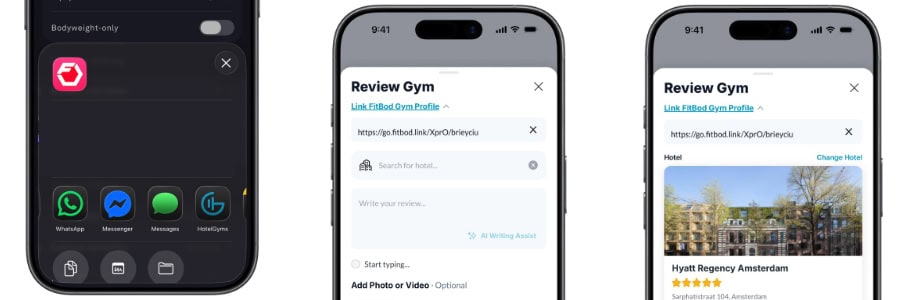
On HotelGyms.com, you can take this further. When you post a review for a hotel gym, you can attach your Fitbod Location as part of that review. Instead of just describing what was in the gym, you leave behind the exact equipment setup that worked there, so the next traveler booking the same hotel can import it directly rather than guessing what to select.
A tighter integration is coming with the HotelGyms.com mobile app, making it easier to attach your Location to a review directly from your phone. When you share the Fitbod Location to the HotelGyms.com mobile app, the link is added automatically, you only need to select the hotel and write your review.
Some Final Words
A well-built Location turns Fitbod from a generic workout generator into a genuine travel training partner. Build one for hotel gyms and one for hotel rooms, keep the equipment list honest, and let My Plan carry your training approach across the trip instead of restarting it at every check-in.
Before you rely on any Location, check the GymFactor score of your hotel on HotelGyms.com. It takes 30 seconds and tells you exactly what to expect from the gym, so you can build the right setup before you even land.
Want the full app breakdown first? Read our complete Fitbod review, or get started with a 25% discount.
FAQs
Is Fitbod’s Gym Profile the same thing as My Plan?
Not exactly. My Plan is the broader hub that now holds your goal, training split, experience level, and preferences in one place. What used to be a full, separate “Gym Profile” for each place you train is now called a Location, managed inside My Plan under Equipment & Locations.
How many Locations should I create for travel?
Two is enough for most travelers: one for a fully equipped hotel gym and one for a hotel room with no equipment. Add a third only if you regularly train somewhere with a distinct equipment setup, such as an outdoor circuit park.
Do I lose my training settings when I switch Locations?
No. Your goal, training split, and experience level live in My Plan, not in the individual Location, so they stay the same across all your locations. Only the equipment list changes, which is exactly what should change when you move between a hotel gym and a hotel room.
Can I share my Location with someone else?
Yes, within Fitbod, tap the “…” menu next to a Location and select Share. On HotelGyms.com, you can also attach your Location directly to a hotel review, letting future travelers import the same equipment setup for that property.
What if my hotel gym has less equipment than I expected?
Update the equipment list for that Location on the spot, or switch to Training Session Mods for a one-off adjustment without touching your saved setup. Checking the hotel’s GymFactor score on HotelGyms.com before booking helps you avoid this surprise altogether.