
Every trip now comes with a growing list of accounts. Your fitness tracker, your hotel booking app, your nutrition tracker, your travel insurance portal, your banking app for the currency conversion you need at the airport.
Each one holds a piece of you, and a surprising amount of it is health and finance data: your heart rate history, your body weight, your workout streaks, your payment details. Staying fit and healthy while traveling also means keeping that data secure, and that starts with how you handle passwords.
The Real Scale of the Problem: How Many Logins Are You Actually Carrying?
Think through a single trip. You log into your airline app for the boarding pass, your hotel app to check in, a rideshare app at the airport, a fitness app to keep your streak alive, a nutrition tracker to log meals in a new country, a banking app to check your balance in a different currency, a translation app tied to your account, maybe a rental car app, a local transit app, and a messaging app to stay in touch with family. That is easily ten to fifteen logins for one trip, and most travelers repeat this pattern several times a year, adding new accounts each time rather than retiring old ones.
Each of those accounts is a door. Some hold low-stakes information. Others hold exactly the kind of data you would never hand to a stranger: your resting heart rate and sleep patterns, your body weight history, your location at any given time, your payment card details. Fitness and health apps are often treated as less sensitive than banking apps, but the data itself says otherwise. A breached fitness account can expose months of biometric data, home location patterns from your regular running routes, and enough personal detail to make targeted phishing far more convincing.
The problem is not any single app. It is the sprawl. Most travelers manage this sprawl with weak defaults, reused passwords, minor variations of the same phrase, or password hints that only work when you are sitting at your own desk. That approach breaks down exactly when you need it most: mid-trip, on a new device, with no notebook or sticky note in sight. Getting the underlying habit right, starting with how you generate and store passwords, is what actually closes the gap.
Why “Memorizable” Passwords Fail Travelers
A password like “MyPassword1” is easy to remember, which is exactly why it is easy to guess. It follows a predictable pattern, reuses across services, and gives an attacker a single point of failure. If one app you use gets breached, and one of your passwords leaks, every other account using that same password is exposed too, including the ones holding your health data or your payment methods.
Traveling makes this worse, not better. At home, you might rely on a sticky note, a hint written in a notebook, or a pattern only you know. On the road, none of that is available. You are connecting to unfamiliar Wi-Fi, want to log into your app, and trying to remember which variation of your password you used for which account. The instinct to simplify is understandable. It is also the reason travelers are frequent targets.
The Fix: Random, Unique Passwords for Every Account
The only reliable defense is a long, random password for every single account, generated so it cannot be guessed and never reused. A 20-character random string tied to one service only limits any breach to that one service. This is not a new idea. Security professionals have recommended it for years. The barrier has always been memory: nobody can hold hundreds of random strings in their head.
That is what a password manager solves. It generates the random password, stores it, and fills it in when you need it, on any device, in any country, without you needing to remember anything beyond one master password.
What to Look for in a Password Manager for Travel
- Cross-device sync. Your phone, laptop, and tablet all need access, since you will likely switch between them on a trip.
- Offline access. Hotel Wi-Fi is not always reliable (or secure). A good manager still gives you access to your vault without a live connection.
- Built-in MFA. Many services require a second verification code. A manager that generates and stores these alongside the password removes a second point of friction.
- Secure sharing. Useful for sharing a login with a travel companion, a family member, or a work team, without sending a password over text or email.
- A strong security track record. This is the one category where reputation matters more than convenience.
What I Learned Testing Password Managers Over the Years
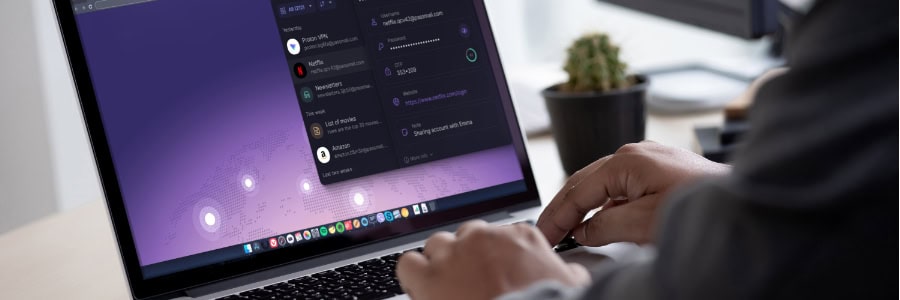
I started generating random 20-character passwords years ago, a different one for every app and service. Over time, I have used several tools to manage them. I started with LastPass, until they disclosed a security breach. I then tested NordPass, before settling on 1Password for the past two years.
Most recently, I switched to Proton Pass. A few things stand out and encouraged me to switch finally:
Built-in MFA changes daily convenience. Proton Pass lets you store the password and the multi-factor authentication code together, and that combination can be shared securely, whether with my HotelGyms.com team for shared work accounts or with family for shared personal ones. It is worth noting that combining password and MFA in the same place is a tradeoff. Security best practice generally recommends keeping them in separate apps, so a single breach cannot compromise both. For most accounts, though, the convenience gain outweighs the small increase in risk, particularly for lower-sensitivity logins.
Proton’s ownership structure matters. Proton is based in Switzerland, states that it does not sell user data, and operates as a foundation rather than a company that can be acquired. That structural detail is part of why the brand has built trust around data sovereignty. I have not moved to Proton’s VPN, email, or storage products, but based on this experience with Pass, they are worth a closer look.
What Sets Proton Pass Apart
A few features go beyond the basics of password storage and matter specifically for travelers:
- End-to-end encryption with a zero-access architecture. Proton itself cannot read your stored passwords. Most password managers encrypt your data, but architecture varies, and zero-access is a stronger guarantee.
- Email aliases. Instead of handing your real email address to every hotel booking site, fitness app, or airline newsletter, you can generate an alias per service. If one alias starts receiving spam or shows up in a breach, you disable that alias and your real inbox stays clean.
- Emergency access. You can designate a trusted contact who can access your vault if something happens to you, which matters when your vault holds critical accounts for family or a business like HotelGyms.com.
- A free plan. A no-cost entry point makes it easy to start building the habit of unique passwords before committing to a paid tier.
- Pricing that holds up against 1Password, Dashlane, and Bitwarden. Worth comparing directly against whichever manager you use today.
Here is how Proton Pass compares feature by feature against the other managers mentioned above:
| Feature | 🟣 Proton Pass | 🟢 NordPass | 🔵 Bitwarden | ⚫ 1Password |
|---|---|---|---|---|
| Integrated Email Alias | ✅ | ✅ | ❌ | ❌ |
| Secure Sharing | ✅ | ✅ | ✅ | ✅ |
| Data Breach Alerts | ✅ | ✅ | ❌ | ✅ |
| 2FA Authenticator | ✅ | ✅ | ✅ | ✅ |
| Password Health | ✅ | ✅ | ✅ | ✅ |
| Free VPN Included | ✅ | ❌ | ❌ | ❌ |
| Free Email Included | ✅ | ❌ | ❌ | ❌ |
| Free Encrypted Cloud Storage | ✅ | ❌ | ❌ | ❌ |
| Open Source | ✅ | ❌ | ✅ | ❌ |
| Emergency Access | ✅ | ✅ | ✅ | ❌ |
| Attachments | ✅ | ✅ | ✅ | ✅ |
| Passkeys | ✅ | ✅ | ✅ | ✅ |
| Free Plan | ✅ | ✅ | ✅ | ✅ |
A Simple Travel Checklist
Before your next trip, make sure your accounts are travel-ready:
- Replace any reused or memorable password with a randomly generated one, starting with your health and finance apps.
- Enable multi-factor authentication wherever it is offered.
- Confirm your password manager syncs across every device you plan to bring.
- Check that your vault is accessible offline, in case you land somewhere without reliable connectivity.
- Set up secure sharing for any account your travel companions or team need access to, instead of sending credentials over chat or email.
Fitness Data Deserves the Same Protection as Financial Data
It is easy to think of password security as a banking problem. For travelers, it is just as much a fitness and health problem. Your workout history, sleep data, and body metrics are personal, and they are worth protecting with the same seriousness as your credit card number. A random password and a reliable manager is a small habit that protects a growing part of your travel life.
If you want to try Proton Pass, HotelGyms.com is a Proton affiliate partner, and readers can currently get a discount on the first year’s subscription plus a 30-day money-back guarantee.
The same principle that applies to your passwords applies to your hotel choice: do not guess, check the data. Before you book, check the GymFactor score of your hotel on HotelGyms.com. It takes 30 seconds and tells you exactly what kind of gym is waiting for you, based on 50+ factors, not guesswork.