
Nutrition apps are a dime a dozen, with one of the most popular options on the market being MyFitnessPal.
However, a relatively new app, MacroFactor, has taken the fitness world by storm. It is slowly proving to be easier to use, more intuitive, and more accurate than many of the “big dogs” on the market, and it has several features that make it particularly valuable for travelers who don’t want to abandon their nutrition goals while on the road.
Read on to learn about this app, how it can elevate your nutrition during your travels, and whether you should try it.
Let’s talk about it.
TL;DR
- Type: Nutrition tracking for home and travel
- Price starts at: $11.99 / month
- Free Version: extended trial of 14-days when using “HOTELGYMS” code
- Best for: Fitness-minded travelers who want intuitive diet tracking that adapts to changing routines
What is MacroFactor?
MacroFactor is a nutrition tracker app that offers incredible customizability, whether you’re at home or exploring a new destination. The app is straightforward to use and constantly adapts to your “total daily energy expenditure” (TDEE), providing the most up-to-date recommendations for your diet, even when your activity levels change during travel.
One thing that sets the app apart from competitors is that MacroFactor receives regular updates, some of which align with scientific findings in the nutritional space. This commitment to evolving with science makes it particularly appealing for health-conscious travelers who want reliable nutrition advice.

Another difference between MacroFactor and other apps is that this app constantly updates your nutritional targets based on your metabolic rate and how it changes over time. This is especially valuable when traveling, as your daily activity levels and calorie needs often fluctuate dramatically from hiking tours one day to lounging by the pool the next.
MacroFactor encourages and rewards users for consistently tracking their nutrition rather than trying to be perfect. This forgiving approach aligns perfectly with travel lifestyles, where strict adherence to meal plans isn’t always possible or desirable when experiencing new cuisines.
Now, here is the kicker:
MacroFactor was created by Greg Nuckols – a well-known fitness expert in the industry. Greg summarizes research in his Monthly Applications in Strength Sports (MASS) review.
In other words, this is different from some look-alike nutrition apps created to offer the same as any other app on the market to make some money. Greg genuinely knows his stuff, especially considering he has competed in both powerlifting and natural bodybuilding.
How MacroFactor works for travelers (and what makes it great)
In their words, “MacroFactor offers an empowering, sustainable approach to nutrition tracking without stress, shaming, or rigidity. It uses scientific algorithms to drive smart recommendations that fit your lifestyle.”
Here is how it works:
First, answer basic questions about your dietary preferences, goals, and lifestyle. The app will recommend calorie and macronutrient goals based on your input data.
Second, take a few minutes daily to log your weight, the foods you eat, and the quantities. MacroFactor will then use the information to calculate your caloric expenditure and needs with even more precision. When traveling, this adaptive approach is invaluable, as your calorie burn might increase significantly from exploring new cities on foot or decrease during long travel days.
From there, the app will make intelligent and accurate changes to your macro plan each week based on how your body responds. This is different from many apps that follow pre-written rules and make new recommendations, regardless of the data you input, a key advantage when your routine changes during travel.
The best part? You do not have to be robotic or perfect with your diet. Simply put, log your weight and food intake; the app will do the rest. Here is how MacroFactor’s pros and cons look for travelers:
| What we like ⭐️ | Not so much ❌ |
|---|---|
| Travel Adaptation: Adjusts to changing activity during trips. | Learning Curve: Interface can take time to get used to. |
| Offline Tracking: Log food without internet, useful for flights or remote areas. | Food Database Gaps: Some regional dishes require manual input. |
| Progress Tracking: Monitors weight trends, even during travel. | No Micronutrients: Focuses on macros, not vitamins or minerals. |
| Easy Logging: Large database and barcode scanning simplify tracking. | Paid Only: No free version, just a 7-day trial. |
And now, let us dive into details of the top four features of MacroFactor that make it ideal for travelers.
How to get started with MacroFactor before your next trip
Getting started with MacroFactor is straightforward. First, go to the App Store or Google Play and download the app. Then, create a profile or log in with an existing one (Google, Apple, etc.).
The app will immediately offer a one-week free trial. You can try it before your next trip to get familiar with the interface.
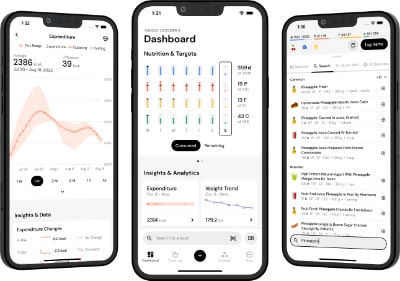
Once inside the app, you will see your dashboard with all the relevant information and features. The information the app displays includes nutritional targets (protein, carbs, fats, and calories), caloric expenditure, weight trends, and more.
One thing the app does well is displaying your nutritional targets for each day and showing you what calories and macronutrients you have covered up to that point, helpful for making food decisions when faced with unfamiliar menus while traveling.
The great things about MacroFactor for travelers
1. Several Inputs for Food Logging, Even When Exploring New Cuisines

You can log your foods with the barcode scanner, manually write the food, or through voice input. The app also allows you to save recipes for future inputs, and you can add additional ingredients if you make specific meals in new ways.
This flexibility is especially valuable when traveling, where you might encounter unfamiliar foods or regional variations of familiar dishes. The barcode scanner works internationally with major brands, making it easier to track nutrition even when food labels are in different languages.
2. Continual Updating of your Expenditure and Nutritional Targets

What sets MacroFactor apart from many other nutrition-tracking apps is that it collects data from the user to determine if their expenditure has changed.
For travelers, this is game-changing. The app considers data such as the number of calories burned during exploration, sightseeing, beach activities, and even accounts for changes in your resting metabolic rate due to shifts in sleep patterns or jet lag.
Other apps use a basic TDEE formula to estimate calorie expenditure and never adjust afterward. In contrast, MacroFactor keeps updating nutritional targets, taking the guesswork out of the equation, especially important when your routine changes dramatically from day to day during travel.
3. Several Ways to Track Your Progress During and After Travel

Nutritional tracking and recommendations are great, but they are only helpful if people can track their progress. After all, how would someone know if their calorie intake is appropriate for their goal when they can not tell if they are seeing improvements?
Because of that, MacroFactor has included the option of uploading progress photos and circumference measures (chest, arms, thighs, waist, etc.) for easy comparison. Combined with weight trends, users can get a much better idea of their trajectory, and identify if that all-inclusive resort stay had a bigger impact than expected.
Is MacroFactor Free? How much does it cost?
There is not a free MacroFactor version. However, there is a 7-day free trial (14-days with our code) to test the app and its features and determine if it is the right fit for your travel and fitness needs.
The app offers three different paid subscription options:
- Yearly – $71.99 per year
- Trial: 7 Days
- Monthly: $11.99 per month
- Every 6 months – $47.99 per 6 months
Are there discount codes for MacroFactor? No, there are no discounts. However, using “HOTELGYMS” as a referral code will extend your free trial when signing up in the app. The affiliate code will auto-fill as you type.
Speed Matters when being on the Road
When you’re traveling, every minute counts, and that’s exactly where the latest Food Logging Speed Index (FLSI) reveals why MacroFactor’s performance matters. On the road, you don’t have time for clunky menus or endless scrolling. Your nutrition app needs to be fast, frictionless, and accurate.
The 2025 FLSI update confirms that MacroFactor still leads the pack, requiring fewer steps than any competitor across all major logging methods, from barcode scans to quick Calorie entries.

That means you can capture meals in seconds and stay consistent even during busy days or long layovers. For anyone balancing fitness goals with travel, MacroFactor’s speed isn’t just a feature; it is the difference between tracking and giving up.
Our Thoughts on MacroFactor for Fitness-Minded Travelers
In short? We find this app particularly valuable for travelers who want to maintain nutritional awareness without sacrificing enjoyment of local cuisines. It provides everything users need to track their food and chase the right nutritional targets that align with their goals, even when away from home.
The app’s algorithm makes it easy to use, intuitive, and far more accurate than some other nutritional trackers on the market, especially when dealing with the variability of travel routines. It’s like having a nutrition coach in your pocket that understands the challenges of staying on track while exploring new destinations.
With its rich food database, multiple options for logging meals, simple and intuitive interface, and dynamic nutritional recommendations, MacroFactor is a fantastic option for travelers looking to balance enjoyment of local foods with their long-term fitness goals.
Conclusion
MacroFactor is a simple, intuitive, and flexible nutrition-tracking app that adapts well to the changing routines of travel. It features a great user interface, constantly updated and accurate nutritional recommendations, a rich food database, and several ways to log food, even when you’re exploring new cuisines.
The app makes nutrition tracking a natural part of the day and is designed to promote consistency over perfection, which is exactly what most travelers need to maintain their fitness goals while still enjoying their journeys.
FAQs
Let us summarize the article by going over some of the typical questions travelers ask related to the app:
1. How does MacroFactor help when traveling to destinations with unfamiliar foods?
MacroFactor’s extensive food database, barcode scanner, and custom food creation options make it easier to track nutrition even when encountering unfamiliar cuisines. The app’s flexibility allows you to estimate portions and macros even when exact measurements aren’t possible.
2. Can MacroFactor work offline during flights or in areas with poor connectivity?
Yes, MacroFactor allows you to log your foods offline, and it will sync once you’re connected again, perfect for long flights or remote destinations with spotty internet.
3. How does the app handle changing activity levels during travel?
Unlike static calorie calculators, MacroFactor continuously adjusts your calorie and macro targets based on your weight trend and food intake, automatically accounting for increased walking while sightseeing or decreased activity during travel days.
4. Can MacroFactor help balance enjoying local cuisine with fitness goals?
Absolutely! The app’s focus on consistency rather than perfection makes it ideal for travelers who want to enjoy local foods while staying aware of their overall nutrition. It helps you make informed choices without rigid restrictions.
5. How can I use MacroFactor to maintain my fitness routine when staying at hotels?
MacroFactor complements your hotel gym workouts by helping you maintain nutritional awareness. When paired with information about hotel fitness facilities (which you can find on our platform), you have a complete solution for staying fit while traveling.